
Build online forms in minutes. Collect every answer in one place.
Describe it, and AI drafts it. Then fine-tune the form in a drag-and-drop builder, share it anywhere, and manage every submission from one inbox, with spam protection built in.
Free to start · No credit card required
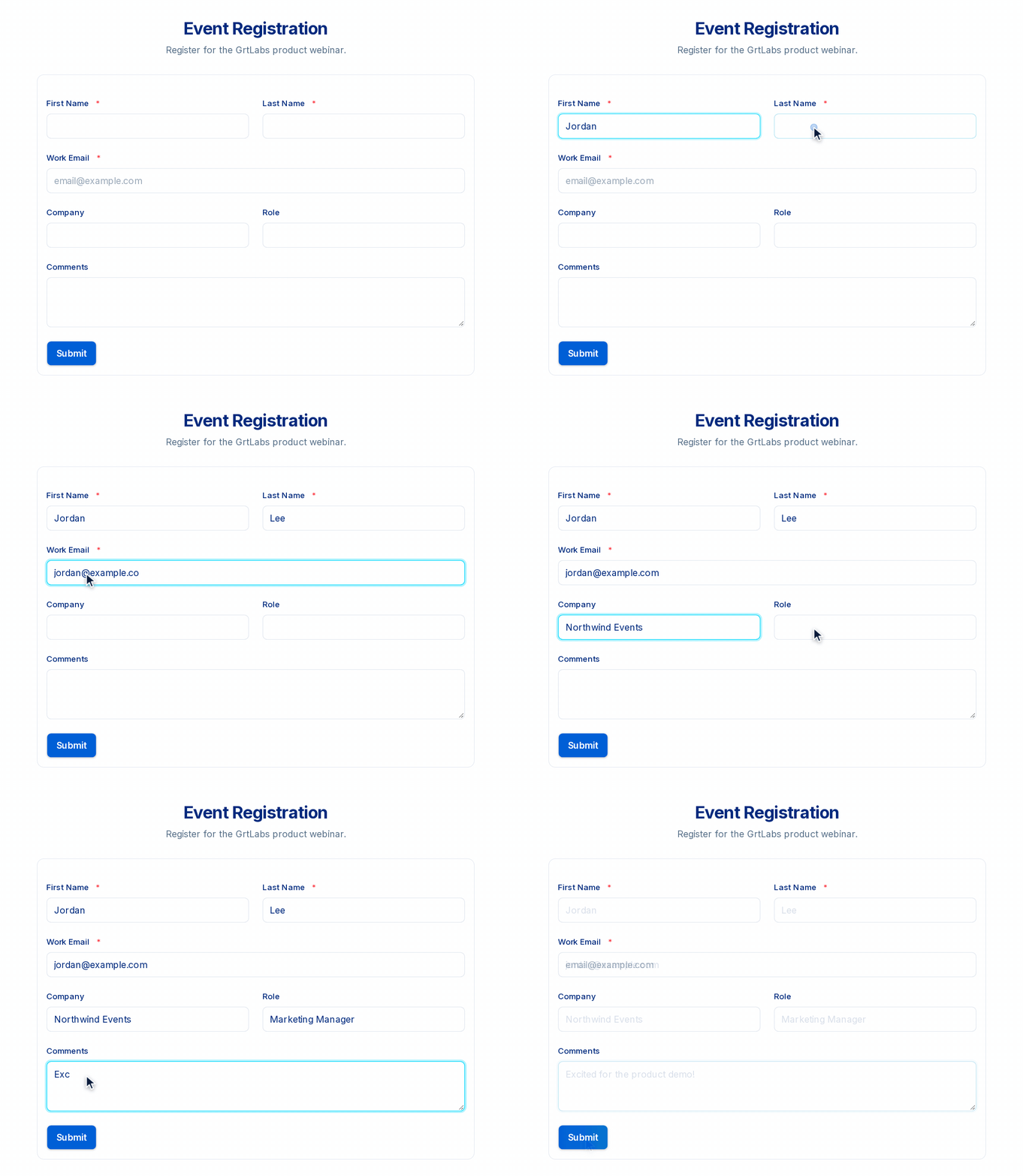
A real GRTforms form. Try it yourself.
No-code builder
Drag and drop from 14 field types, with side-by-side layouts and conditional logic.
Share anywhere
Use a public link, or embed the form on your website with iframe or JavaScript.
One submissions inbox
Search, filter and select responses, export to Excel, CSV or PDF, and get an email when a new submission arrives.
Spam protection built in
Block abusive IPs, get abuse alerts in the app and by email, and add CAPTCHA to any form.
From idea to live form in three steps
No developers and no hosting to set up. Sign up, build your form, and start collecting.
Build
Start from a blank form or a template, or describe what you need and let Create with AI draft it. Then drag in fields, set the layout and add logic.
Share
Publish your form and share its public link, or embed it on your website with a copy-and-paste iframe or JavaScript snippet.
Collect and act
Responses arrive in your submissions inbox. Review them, export them to Excel, CSV or PDF, or send each one to your other tools with webhooks.
Describe your form. AI drafts it.
With Create with AI, you describe the form you need in plain words. GRTforms builds a draft with fields, pages and a theme, then opens it in the builder so you can edit it before you publish.
- Start from a sentence instead of a blank page. Say who the form is for and what you need to ask.
- Set the basics. Pick a template category, a theme, 1 to 10 pages, and a language: English, Spanish, French, German or Portuguese.
- You stay in control. The draft opens in the drag-and-drop builder. Change anything you like. Nothing goes live until you publish.
- Private by design. Only your prompt is sent to the AI, never your respondents’ answers, and the prompt isn’t stored.
Describe the form you need
The kind of draft you could get
Illustrative mock-up, not a product screenshot. Drafts depend on your prompt.
AI refine in the builder. Edit a form by chatting with AI. For example, ask it to translate your labels or suggest logic rules.
Everything you need to collect better data
Build it, share it, manage the responses and keep spam out, all in one product.
A drag-and-drop builder that handles the hard parts
Put fields where you want them, set them to half width to sit side by side, and use logic so each person sees only the questions that apply to them.
- Conditional logic: show or hide fields, skip pages, and show a different confirmation message or redirect based on answers
- Multi-page forms, required fields and built-in validation
- Hidden fields that capture UTM and campaign values from the URL
- E-signatures, file uploads and star ratings
- Hide the form header for a clean look, and add your own CSS ID or class to any field
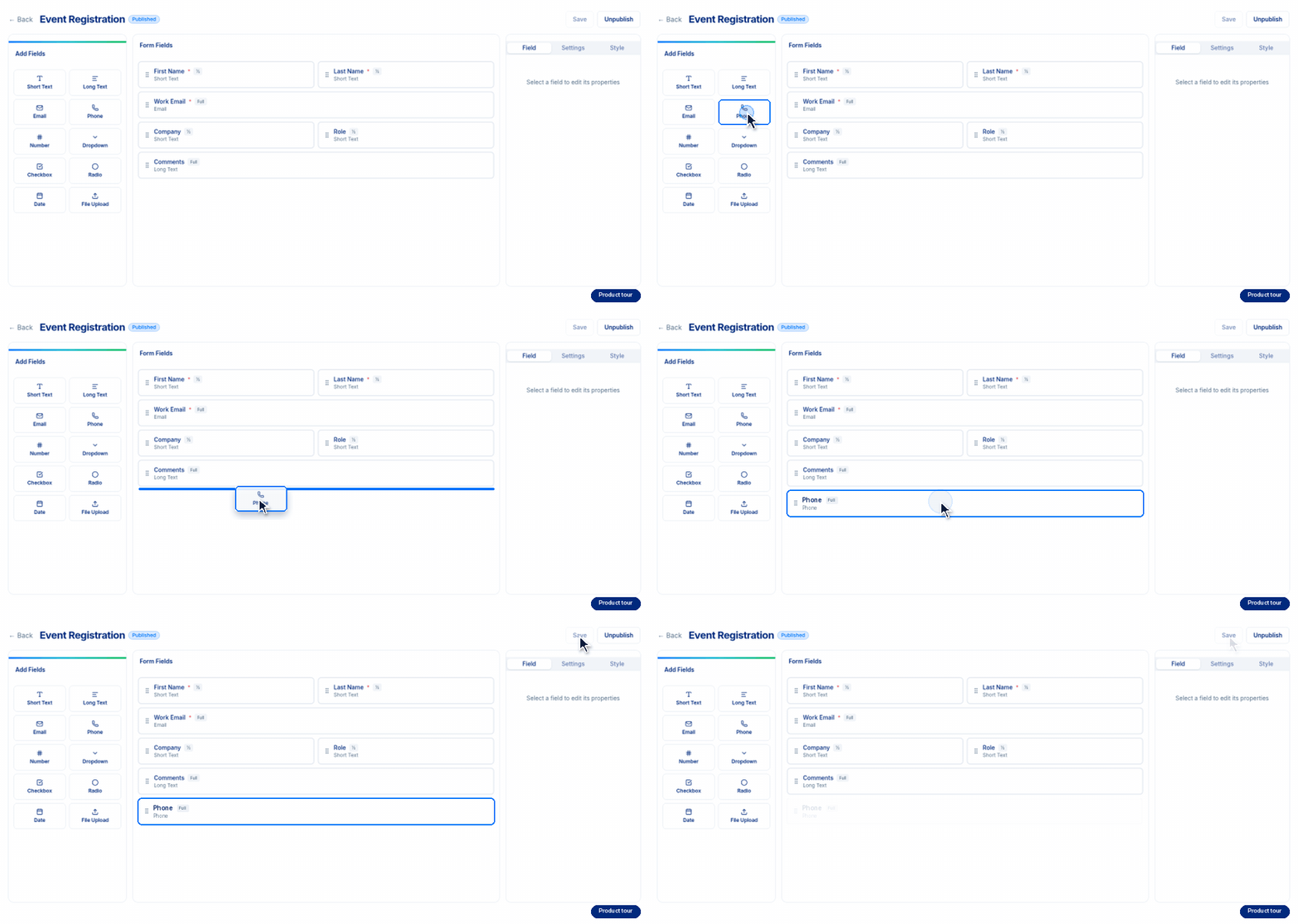
Product tour animation of the GRTforms builder
Put your form wherever your audience is
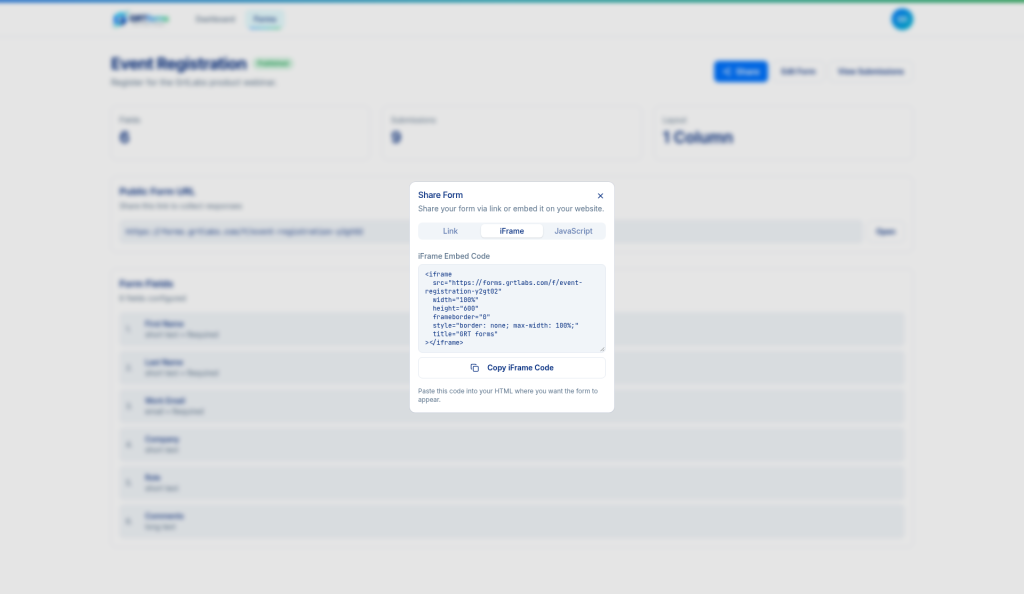
Every form gets its own public link. To keep people on your website, copy an iframe or JavaScript embed snippet and paste it into your page.
- Public link, iframe embed and JavaScript embed in one share panel
- Add your Meta Pixel, Google Tag Manager, GA4 or HubSpot tracking to measure conversions
- Send each new submission to your own systems with webhooks
- Pre-fill hidden fields from the link to track where each lead came from
Every response, organized and ready to use
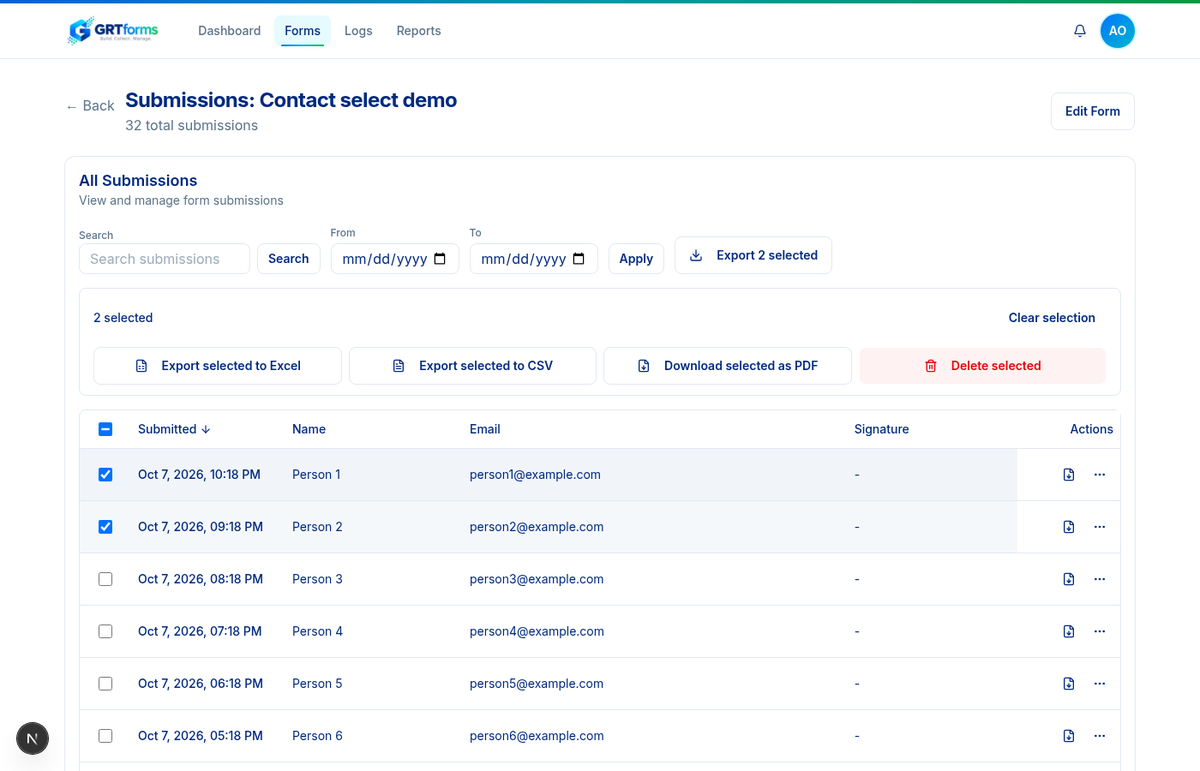
Find any submission in seconds, then pass the results to your team in the format they already use.
- Search, filter by date, and view or edit any submission
- Get an email when someone submits (see notifications docs)
- Select single rows, a full page, or every match for your filters
- Export to Excel, CSV or PDF, or delete in bulk
- Works on your phone too, with a bulk action bar that stays in reach
Keep spam and abuse out of your inbox
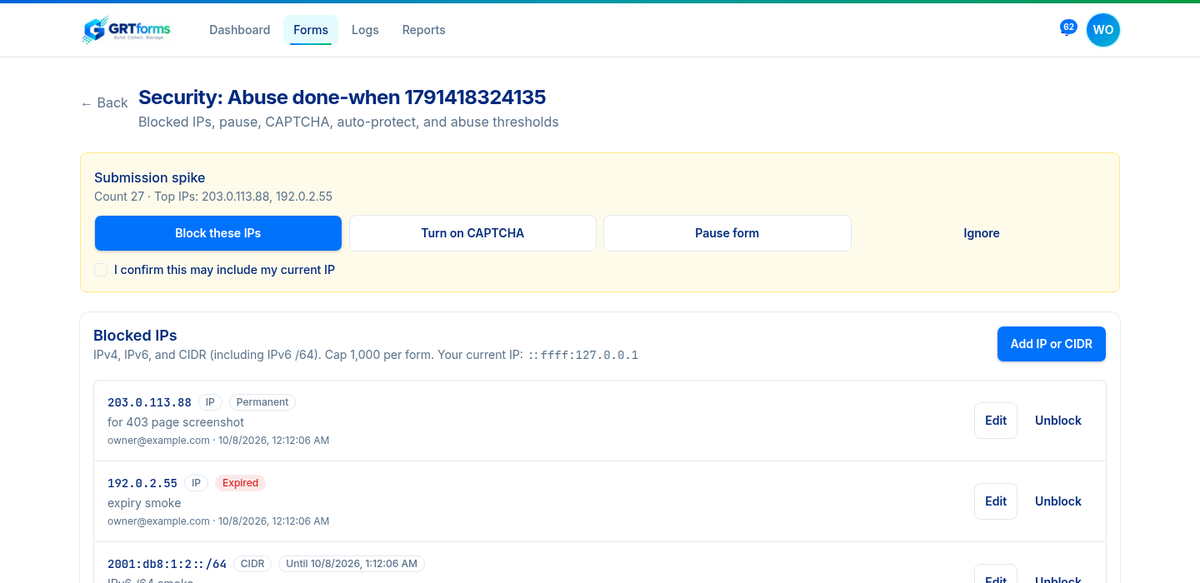
Automatic rules watch for spikes, repeat submissions and other signs of abuse. When something looks wrong, an in-app alert and an email let you act with one click.
- Abuse alerts in the app and by email, with one-click Block, Turn on CAPTCHA, Pause form or Ignore
- Block single IP addresses or whole ranges, permanently or for a set time
- Cloudflare Turnstile CAPTCHA on any form, and on sign-up and login
- Flagged entries go to a Suspicious filter, so nothing is silently lost
- Optional auto-protect, and a pause switch when you need it
One form builder for the whole business
From the first lead to a signed agreement, GRTforms covers the forms your team uses every day.
Lead capture
Contact and quote forms that record the campaign each lead came from, fire your tracking tags, and can pass leads to your CRM with webhooks.
Event registration
RSVPs and webinar sign-ups that fit side by side on any screen. Export the attendee list when you need it.
See the demo form →Contracts and e-signatures
Agreements, consents and sign-off forms with a Signature field, so you collect details and a signature together.
Job applications
Multi-page applications with resume uploads and screening questions that adapt to each candidate’s answers.
Surveys and feedback
Star ratings, multiple choice and open comments, with logic that skips questions people don’t need to answer.
Client intake
Onboarding forms that collect documents, details and a signature in one go, so projects start with everything you need.
Works with the tools you already use
Connect GRTforms to your website, analytics and back office.
Coming soon to GRTforms
These features are in development and not available yet.
Send respondents a confirmation after they submit.
Customize the look of your forms to match your brand.
Take payments directly in your forms.
Edit forms by chatting with AI.
Questions, answered
Is GRTforms free to start?
Yes. You can create an account and start building forms for free. No credit card is required. See plans and pricing and our commitments. If your team has specific needs, talk to us.
Do I need any coding skills?
No. You build forms by dragging and dropping fields, and you share them by copying a link or an embed snippet. Developers can still add their own CSS or connect webhooks if they want to.
Can AI build a form for me?
Yes. Use Create with AI to describe the form you need in plain words. GRTforms drafts the fields, pages and theme in the language you choose, and opens the draft in the builder for you to review and edit before you publish. Only your prompt is sent to the AI, never your respondents’ answers.
Can I put a form on my own website?
Yes. Copy the iframe or JavaScript embed snippet from the share panel and paste it into any page that accepts HTML, including WordPress. You can also hide the form header for a cleaner fit.
How does GRTforms keep out spam?
Automatic rules watch for submission spikes, repeat submissions and other abuse patterns, and alert you in the app and by email. From the alert you can block IPs, turn on Cloudflare Turnstile CAPTCHA, pause the form or ignore the alert, all with one click.
Can I export my submissions?
Yes. Select the responses you want, or everything that matches your filters, and export them to Excel, CSV or PDF.
Does GRTforms send email notifications?
Yes. Form owners can get an email when someone submits (see the notifications docs). Respondent confirmation emails are still coming soon. New responses also appear in your submissions inbox, and you can send each one to your own tools with a webhook.
Your next form is a few minutes away
Build it, share it and start collecting responses today.