
Runway: reorder report and days of cover for BigCommerce
Runway is a GrtLabs app that shows what to reorder before you stock out. Every SKU with units sold in the last 30, 60 and 90 days, stock by location and days of cover, shortest cover first. Read-only. Runway for BigCommerce is in BigCommerce marketplace review; the Shopify version is coming soon.
See Runway in action
Preview of the Shopify version (coming soon). The BigCommerce version, now in marketplace review, works the same way.
This 2.5-minute walkthrough shows Runway’s read-only reorder report: sales for the last 30, 60 and 90 days, stock by location, days of cover, filters, search, sorting and CSV export.
Read the transcript
This is GrtLabs Runway, a read-only reorder and inventory report. It opens embedded right inside the Shopify admin.
Each row is a SKU. You see sales for the last 30, 60 and 90 days, stock at each location, total on hand, and days of cover.
Sales show zero here because access to Shopify’s sales reports, which count as protected customer data, is still pending Shopify’s approval. The yellow banner explains this. The stock levels you see are current.
Scrolling down shows every SKU in the store. Filter tabs narrow the list: Low cover, under 14 days; Out of stock; and All SKUs.
The search box finds SKUs by SKU or product name. Searching for Snowboard shows just the matching products. Clearing the search returns the full report.
Click a column header to sort. Here the report is sorted by Total on hand.
Export CSV downloads the reorder list as a CSV file.
The user guide explains each column, the filters, and the export in plain language.
Runway is read-only. It never changes your store data.
Back to the report.
A clear reorder list from your own store data
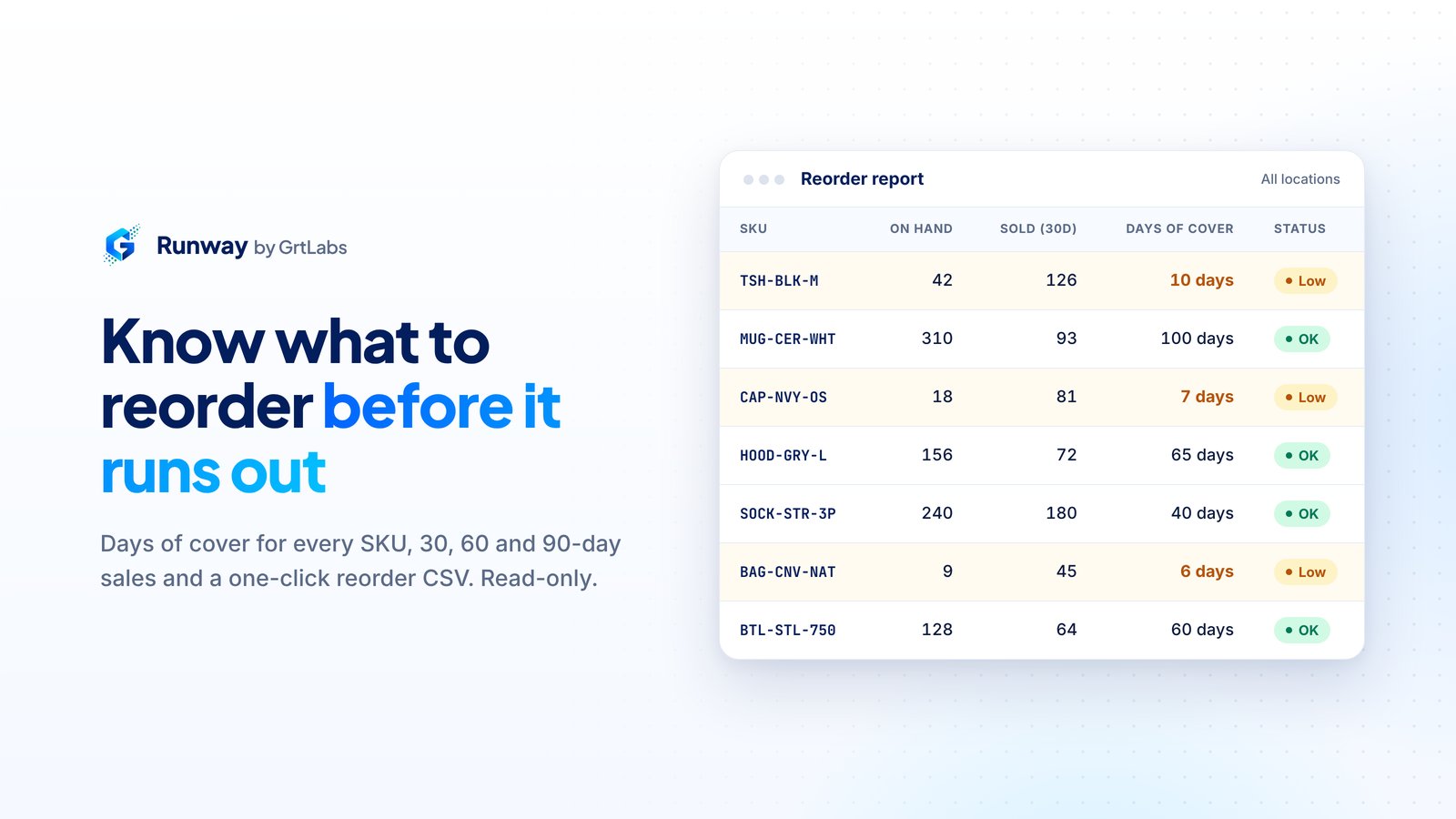
Runway is a reorder and inventory report from GrtLabs, a Houston AI lab. It is built to run embedded in the BigCommerce control panel and read your orders, products and inventory with read-only access. Runway for BigCommerce is in BigCommerce marketplace review and is not publicly listed yet; contact us for early access. Each row is a SKU. You see units sold in the last 30, 60 and 90 days, on-hand stock at each location, total on hand and days of cover, with the shortest cover first.
Days of cover is total on hand divided by average daily sales over the last 30 days. For example, a mug with 20 on hand that sold 60 in 30 days has 10 days of cover. If a product sold nothing in 30 days, its cover is blank rather than infinite, and those rows sort last.
Runway never changes your products, inventory, orders or prices. It does not create purchase orders or email suppliers. You decide what to buy and place the order in your own process, using the CSV if you like.
What Runway shows you
One table, built for the question every merchant asks before placing an order: what runs out first?
Days of cover for every SKU
Runway estimates how many days of stock each SKU has left at its recent sales pace and sorts the report shortest cover first, so the items that need attention are at the top.
Sales for 30, 60 and 90 days
Units sold in the last 30, 60 and 90 days sit side by side for each SKU, so you can compare recent demand with a longer trend before you reorder.
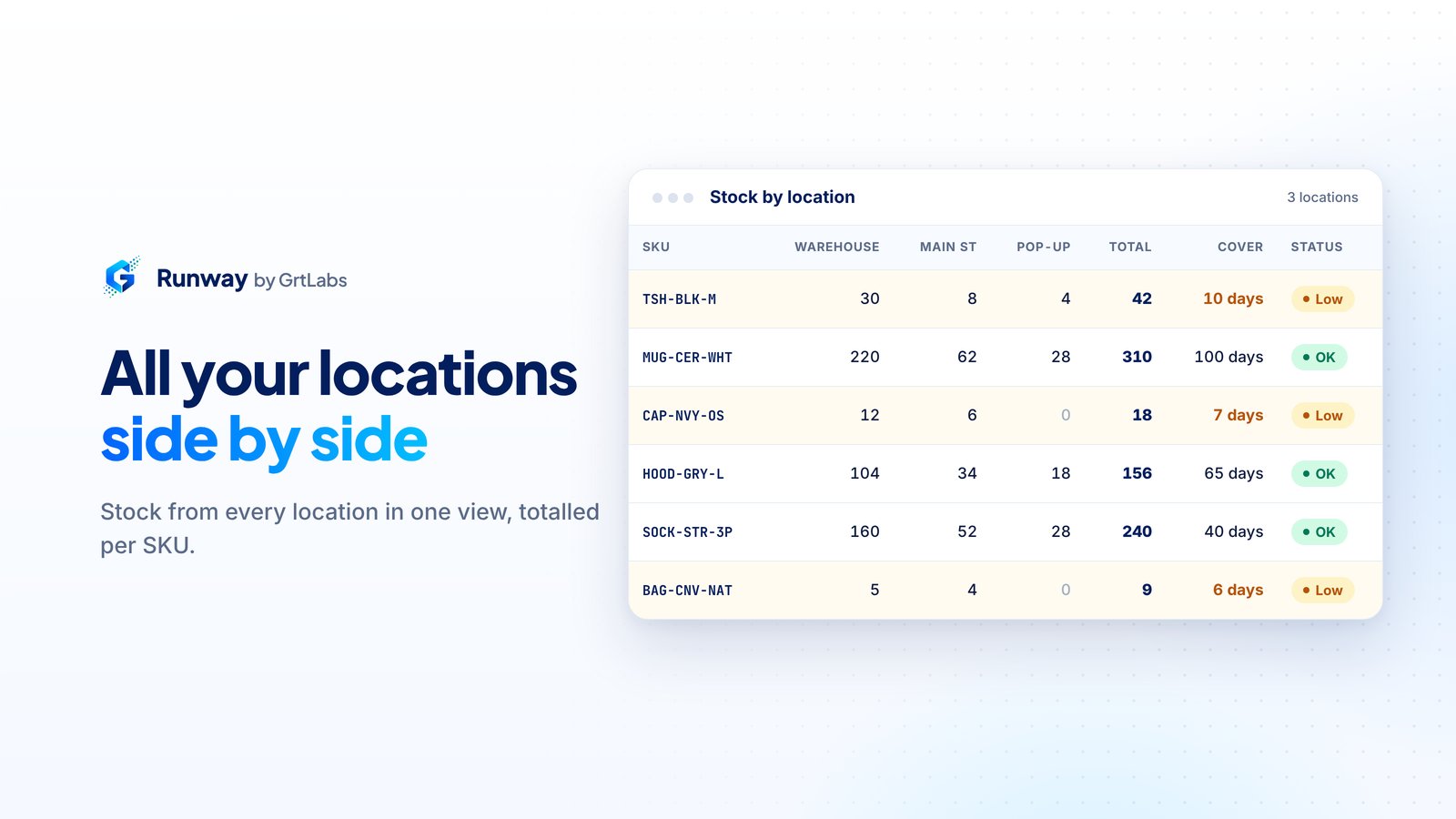
Stock by location
Each inventory location gets its own column, plus a total on hand per SKU. If BigCommerce does not allow the location read, the on-hand column uses the product’s inventory level.
Stock filters
Filter buttons narrow the list to All SKUs, Low cover (under 14 days), Out of stock, or No sales velocity, where cover cannot be calculated because there were no recent sales.
Search and sort
Search by SKU or product name. Click any column header to sort the whole report, and click it again to reverse the order. Filters stay on while you sort and page through results.
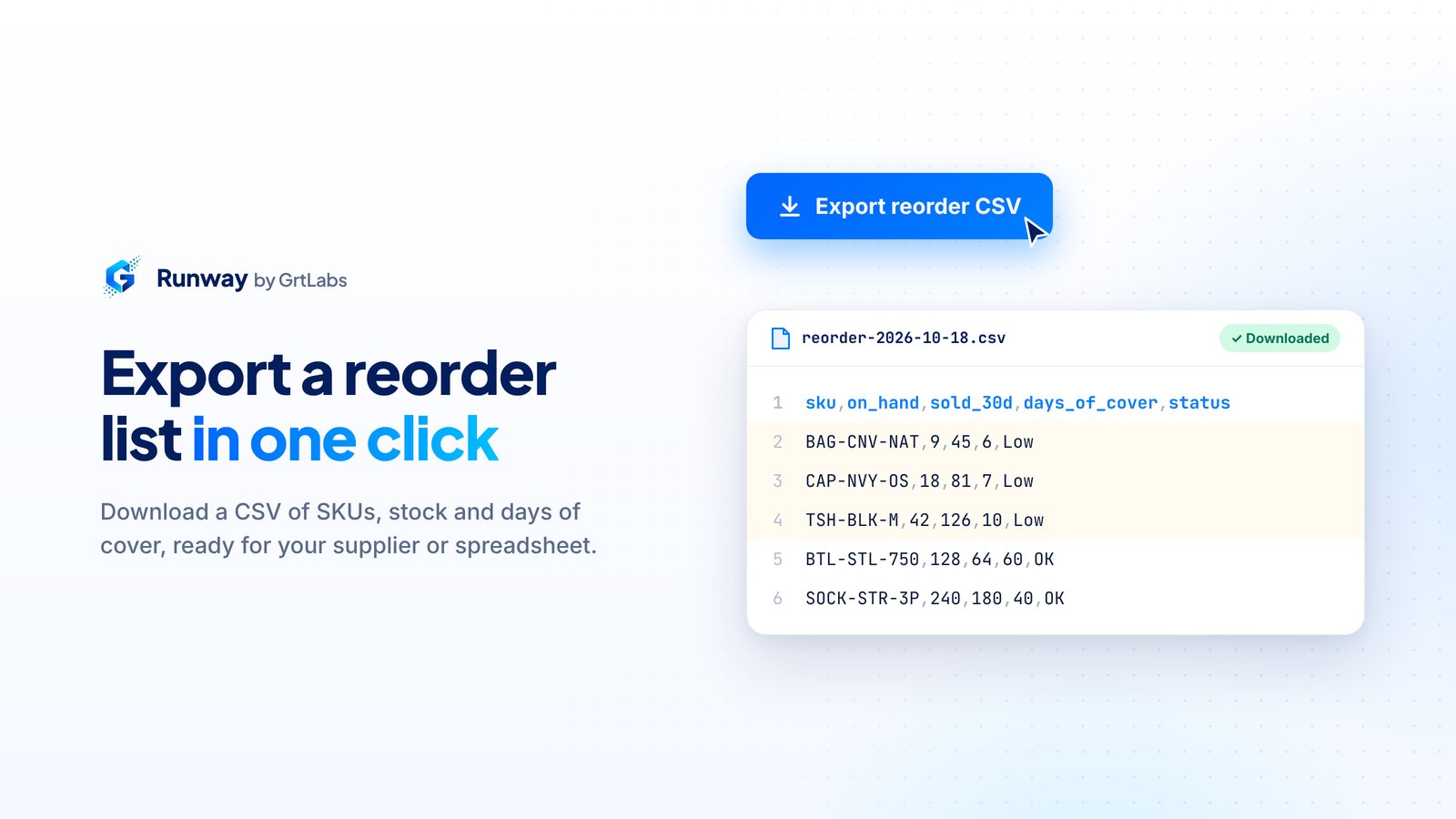
CSV export
Export CSV downloads every row that matches your current search, filter and sort, not just the page you are viewing, ready for your supplier or spreadsheet.
How it works
From early access to a reorder list in four steps. Runway uses read-only access the whole way through.
1. Request early access
Runway for BigCommerce is in BigCommerce marketplace review. Contact GrtLabs for early access. When your store is connected, you approve read-only access to orders, products and inventory.
2. Open the report
Open Runway in your BigCommerce control panel. The reorder table loads for your store with every SKU, sorted by shortest days of cover.
3. Review and filter
Use the filters, search and column sorting to find what is running low. Click a product name to open it in the BigCommerce product editor.
4. Export and reorder
Download the CSV and place the purchase order with your supplier yourself. Runway keeps reading; it never writes to your store.
What Runway does not do
- Create purchase orders or email suppliers.
- Write inventory, change products or edit orders.
- Keep a standing copy of your catalog or sales. Report data is computed when you open the app.
Why GrtLabs
Runway is built and supported by GrtLabs Inc in Houston, the same team behind our AI development work in Houston. We built it to be plain and predictable: read-only scopes, clear numbers and a blank cover instead of a misleading one.
Your store’s access token is encrypted at rest, and app data is hosted in the United States. Uninstalling Runway from BigCommerce removes its access and deletes that store’s data from our database. Details are in the Runway Privacy Policy.
Need help? Email [email protected], call 713.714.6849, or see Runway support.
Screenshots
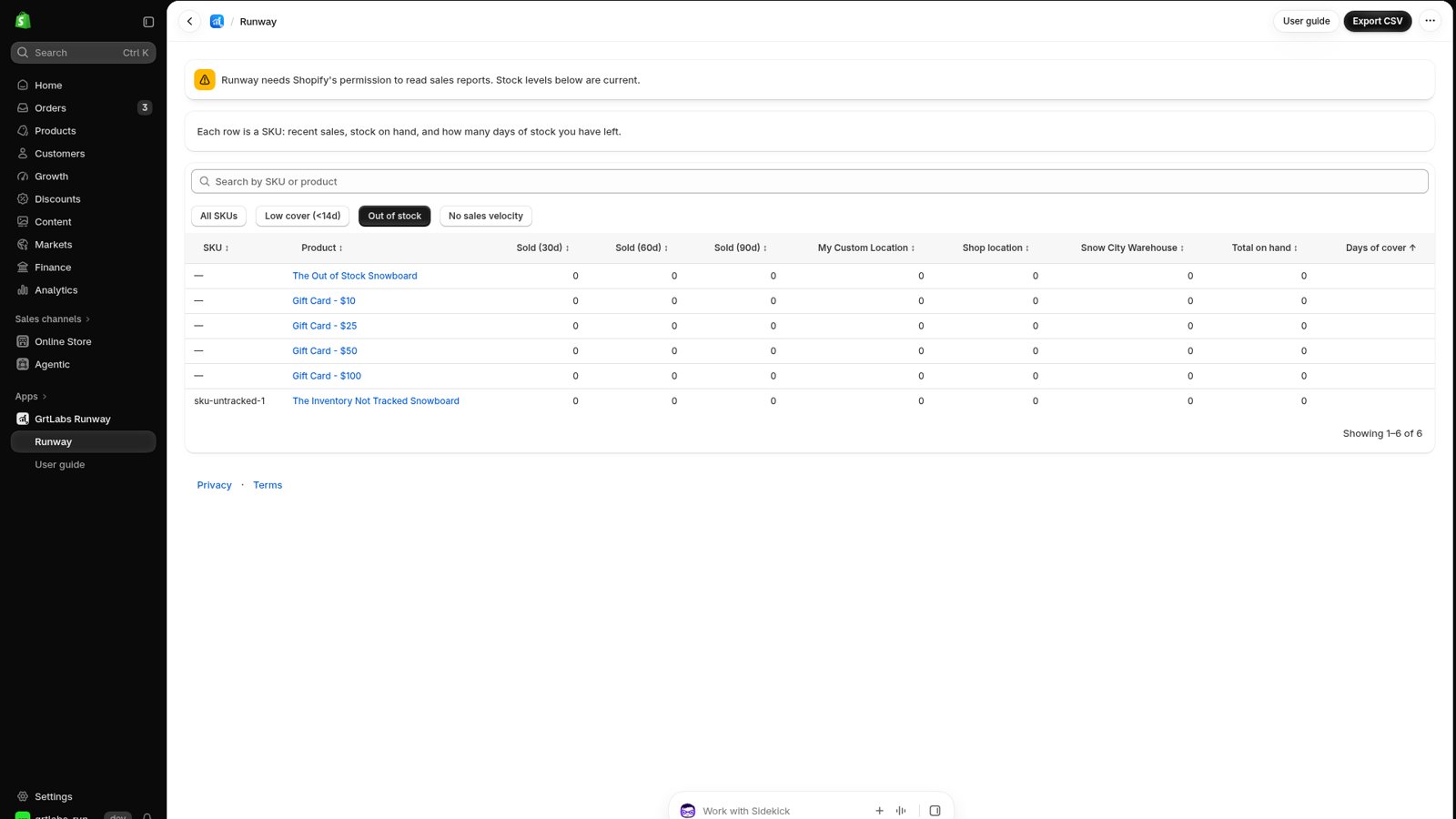
Preview of the Shopify version of Runway, which is coming soon and not yet published.
Runway resources
- Request early access to Runway for BigCommerce
- Runway support
- Runway Privacy Policy
- Runway Terms of Service (includes pricing terms)
- GRTforms, our forms app
- AI Automation for inventory and back-office work
FAQ
What does Runway do?
Runway shows what to reorder before you stock out. It reads BigCommerce orders and inventory and lists every SKU with units sold in the last 30, 60 and 90 days, stock on hand and days of cover, with the shortest cover first. You can download a CSV.
Does Runway create purchase orders or change inventory?
No. Runway is a read-only reorder report. It does not create purchase orders, email suppliers, or change products, inventory or orders.
What is days of cover?
Days of cover is how many days your current stock would last at the recent sales rate: total on hand divided by average daily sales over the last 30 days. A mug with 20 on hand that sold 60 in 30 days has 10 days of cover. A product with no sales in 30 days has a blank days of cover.
Is Runway available in the BigCommerce marketplace or on Shopify?
Not yet. Runway for BigCommerce is in BigCommerce marketplace review and is not publicly listed. A Shopify version is coming soon. Contact GrtLabs for early access.
What happens to my data if I uninstall Runway?
Uninstalling Runway from the BigCommerce control panel removes its access and deletes that store’s data from our database, including the encrypted access token and saved app settings.
How do I get early access or support?
Email [email protected], call 713.714.6849, or use the GrtLabs contact page. Runway for BigCommerce is in BigCommerce marketplace review, so early access is arranged directly with GrtLabs.
Talk to us
Runway for BigCommerce is in BigCommerce marketplace review. Want early access, or have questions about Runway? Contact the GrtLabs team in Houston.