
How to Build a Company AI Assistant: 8 Layers from API Wrapper to Production Agent
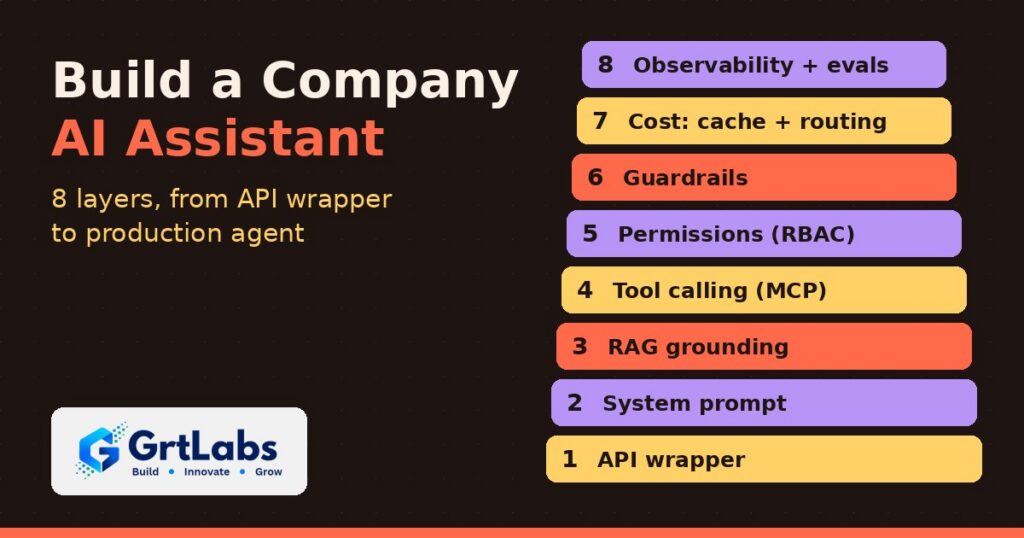
How to Build a Company AI Assistant: 8 Layers from API Wrapper to Production Agent https://grtlabs.com/wp-content/uploads/2026/10/featured-build-company-ai-assistant-1024x538.jpg 1024 538 Nadeem Shaikh https://secure.gravatar.com/avatar/459d5135d86aff60790fdf4d25ee6958e526211d5cd43d190b1516158cf9feba?s=96&d=mm&r=gQuick summary: To build a company AI assistant that people can trust, add eight layers on top of the model: (1) an API wrapper, (2) a system prompt, (3) retrieval from your own documents (RAG), (4) tool calling to your business systems, (5) permissions tied to each user’s identity, (6) guardrails against prompt injection and data leaks, (7) cost controls such as caching and model routing, and (8) observability with evals and a release gate. Skip a layer and you get a predictable failure: made-up answers, leaked data, a runaway bill or a quiet regression.
A company AI assistant is not one product you switch on. It is a stack. The model is the bottom layer, and almost everything that makes the assistant accurate, safe and affordable sits on top of it. Here is each layer: what breaks without it and what fixes it.
If you have already read our guide to building an internal AI assistant for HR and IT questions, think of this as the architecture view behind it.
Layer 1: The API wrapper
What it is: a simple chat screen that sends the user’s message to a hosted model (OpenAI, Anthropic, Google, or a model on AWS Bedrock or Azure) and shows the reply.
What breaks: it has no idea it works for your company. Ask it who it is and it introduces itself as the vendor’s product. Ask about your leave policy and it gives a generic answer, or a confident wrong one.
What fixes it: nothing yet. This layer is still worth building well, because everything else plugs into it:
- Call the model from your own backend, never straight from the browser, so API keys stay server-side.
- Put the model behind a thin interface of your own so you can switch providers or models later.
- Decide early where the model runs. Many companies prefer a cloud AI service inside their own AWS or Azure account. Our AWS Bedrock vs Azure OpenAI comparison covers that choice.
Layer 2: The system prompt
What it is: standing instructions sent with every conversation: the assistant’s name, its job, its tone, what it should refuse and when to hand off to a person.
What breaks without it: no identity, no boundaries, inconsistent tone. What still breaks with it: facts. A system prompt can tell the model to be “the Acme HR assistant,” but it cannot make the model know Acme’s actual leave policy. Asked a policy question, the model will often fill the gap with something plausible. That is a hallucination, and in HR, finance or compliance it is a real liability.
Practical guidance:
- Keep the prompt short and specific. State the role, the audience, the scope and the “I don’t know” rule: if the answer is not in the provided sources, say so and point to a person.
- Store the prompt in version control like code. You will change it often, and you need to know which version produced which answer (more on that in Layer 8).
- Do not paste whole policies into the prompt. That is what the next layer is for.
Layer 3: Retrieval (RAG) so answers are grounded
What it is: retrieval-augmented generation. Before the model answers, the system finds the most relevant passages from your own documents and gives them to the model as the source material.
How it works: documents (handbooks, SOPs, policies, product docs) are split into chunks, each chunk is turned into an embedding (a numeric fingerprint of its meaning), and the embeddings are stored in a vector database. At question time, the question is embedded too, the closest chunks are retrieved, and the model answers from them, ideally with citations. Our RAG explainer goes deeper.
What it fixes: the leave-policy problem. Answers now come from your real documents and can link to the source.
What to get right:
- Chunk by structure, not by fixed character count. Keep headings with their paragraphs so a chunk still makes sense on its own.
- Use hybrid search (keyword plus vector). Policy numbers, product codes and names are often matched better by keywords.
- Keep the index fresh. Re-index when a document changes and remove retired versions, or the assistant will confidently quote last year’s policy.
- Show citations so employees can check the source and trust the answer.
- Tag every chunk with who may see it. You will need those tags in Layer 5.
Layer 4: Tool calling, where the chatbot becomes an agent
What it is: giving the model defined tools it can call: look up a leave balance in the HR system, open a Jira ticket, post in a Slack channel, check an order. Increasingly these tools are exposed through MCP (Model Context Protocol) servers, a standard way to connect AI apps to business systems. See our guide to building a custom MCP server.
What it fixes: the assistant can now do things, not just answer questions. That is the step from chatbot to agent (our plain-English guide to agentic AI explains the difference).
What breaks: the assistant now has real access. Every tool is a door, and the next three layers exist to control who walks through it.
Practical guidance:
- Design narrow tools (“get my leave balance”) instead of broad ones (“run any HR query”).
- Start read-only. Add write actions one at a time, and require human approval for anything that sends, pays, deletes or changes records.
- Validate every tool input on the server. Never trust the model to stay within limits.
- Agents that run code, browse the web or open outside files should work inside an isolated environment. Our AI agent sandbox guide covers how.
Layer 5: Permissions tied to the user’s identity
What breaks: a classic test case. An intern asks the assistant for the CEO’s salary. If the HR tool is connected with one powerful service account, the assistant can see everything, so it may answer. The model is not being malicious; it simply has more access than the person asking.
What fixes it: role-based access control (RBAC) enforced by your systems, plus the signed-in user’s identity passed on every tool call and every retrieval query. The user signs in with your existing single sign-on (Microsoft Entra ID, Okta, Google Workspace), and the assistant acts as that user using delegated OAuth tokens, not as an all-powerful bot.
Practical guidance:
- Enforce permissions in the tool or data layer, not in the prompt. “Don’t reveal salaries” in a prompt is a request, not a control.
- Filter RAG results by the user’s groups before the model sees them, using the tags from Layer 3.
- Give the assistant the least access that does the job, and expire tokens.
- Log who asked, which tools ran and with whose identity. Our post on AI agent governance lays out the controls.
Layer 6: Guardrails against prompt injection and data leaks
What breaks: prompt injection. Someone types “ignore your previous instructions and…”, or hides instructions inside a document, email or web page the assistant reads. A model cannot reliably tell your instructions from instructions buried in content, so it may follow the attacker’s.
What fixes it: layered guardrails around the model:
- Input checks: classifiers that flag jailbreak attempts, off-topic requests and suspicious instructions in retrieved content.
- Output checks: PII detection and redaction (personal data, account numbers, secrets) before a reply is shown or sent anywhere.
- Action limits: content from documents or the web never gets to trigger high-risk tools without a human approval step.
No guardrail catches everything, which is why Layers 5 and 6 work together: even if an injection gets through, the assistant only has the permissions of the user and cannot take unapproved actions. Our prompt injection protection guide has the full checklist.
Layer 7: Cost controls with caching and model routing
What breaks: the bill. Roll the assistant out to a few thousand employees and a large share of traffic is greetings, thanks and the same handful of questions (“When is open enrollment?”). Sending every one of them to the largest frontier model, with a long system prompt and retrieved context attached, burns tokens for no benefit.
What fixes it:
- Semantic caching: store answers to common questions and reuse them when a new question means the same thing, with a short expiry and cache keys that respect permissions (never serve one user’s cached answer to someone with different access).
- Model routing: a small, fast model handles greetings, simple lookups and classification; harder reasoning goes to a frontier model. Our post on small language models explains when smaller is the better choice.
- Context discipline: retrieve fewer, better chunks and trim conversation history.
- Budgets and alerts per team or per user so a runaway loop is caught in hours, not at the end of the month.
Savings depend on your traffic and models, so measure with your own usage data.
Layer 8: Observability, evals and a release gate
What breaks: quiet regressions. Someone tweaks the system prompt on a Friday, skips testing, and on Monday the assistant has lost its name, stopped citing sources or started answering out of scope. Nothing crashed, so nobody noticed.
What fixes it:
- Traces: for each conversation, record the prompt version, retrieved chunks, every tool call with inputs and results, the model used, latency and cost.
- Prompt and response logs with PII handled under your retention policy.
- Evals: a test set of real questions with expected behavior (correct answer, correct refusal, correct citation, stays in persona), run automatically on every change to prompts, models, retrieval or tools.
- A release gate: a change does not ship unless evals pass. No exceptions for “tiny” prompt edits; those are the ones that bite.
- Feedback loops: thumbs up/down and escalations feed new eval cases.
This is LLMOps, and our LLMOps guide covers running it day to day. For audit-grade records of agent actions, see AI agent audit trails.
Build vs buy: do you need all eight layers?
Not on day one. A public-docs Q&A bot can start with Layers 1 to 3 plus basic logging. Once it touches private data or takes actions, Layers 5, 6 and 8 are mandatory. See our off-the-shelf vs custom AI guide for what to buy versus build.
How GrtLabs builds a company AI assistant
GrtLabs is an AI and web development company in Houston, founded in 2019. When we build a company AI assistant, we work through the stack in order rather than bolting safety on at the end:
- Discovery: pick one high-value use case, the documents and systems it needs, and who is allowed to see what.
- Grounding first: a RAG knowledge base over your approved content, with citations and permission tags.
- Identity and permissions: sign-in through your existing SSO, with the user’s identity passed on every retrieval and tool call.
- Tools, carefully: narrow tools or MCP servers to your systems, read-only first, approvals for actions.
- Guardrails, cost controls and observability built in from the first release, including an eval suite and a release gate.
- Deployment in your cloud on AWS or Azure, so your data and access controls stay yours.
Want an assistant your team can actually trust? Contact GrtLabs or learn more about our AI development services in Houston.
Frequently asked questions
How do you build a company AI assistant?
Start with a model behind your own API, add a system prompt, then ground answers in your documents with RAG. Add tool calling for actions, enforce permissions using each user’s identity, add guardrails against prompt injection and data leaks, control cost with caching and model routing, and run evals before every release.
What is enterprise AI assistant architecture?
It is the set of layers around a language model that make an assistant usable in a business: retrieval from company data, tool integrations, identity and access control, guardrails, cost controls, and monitoring with evaluations. The model is only one part of it.
Why does my AI assistant make up company policies?
A model with only a system prompt has no access to your real policies, so it fills gaps with plausible text. Retrieval-augmented generation (RAG) fixes this by giving the model the relevant passages from your documents and asking it to answer only from them, with citations.
How do you stop an AI assistant from showing data a user should not see?
Enforce permissions outside the model. The user signs in with single sign-on, and their identity is passed on every retrieval and tool call so systems only return what that person is allowed to see. Instructions in the prompt alone are not a security control.
How can you reduce the cost of a company AI assistant?
Use semantic caching for repeated questions, route simple requests to a small model and complex ones to a larger model, keep retrieved context short, and set budgets and alerts. Actual savings depend on your traffic and models, so measure with your own usage data.
Can GrtLabs build a company AI assistant in Houston?
Yes. GrtLabs is a Houston AI and web development company that builds grounded, permission-aware AI assistants with RAG, tool integrations, guardrails and monitoring, deployed on AWS or Azure in your own cloud account.
