
AI Chatbot vs AI Assistant vs AI Agent: Which Does Your Business Need?
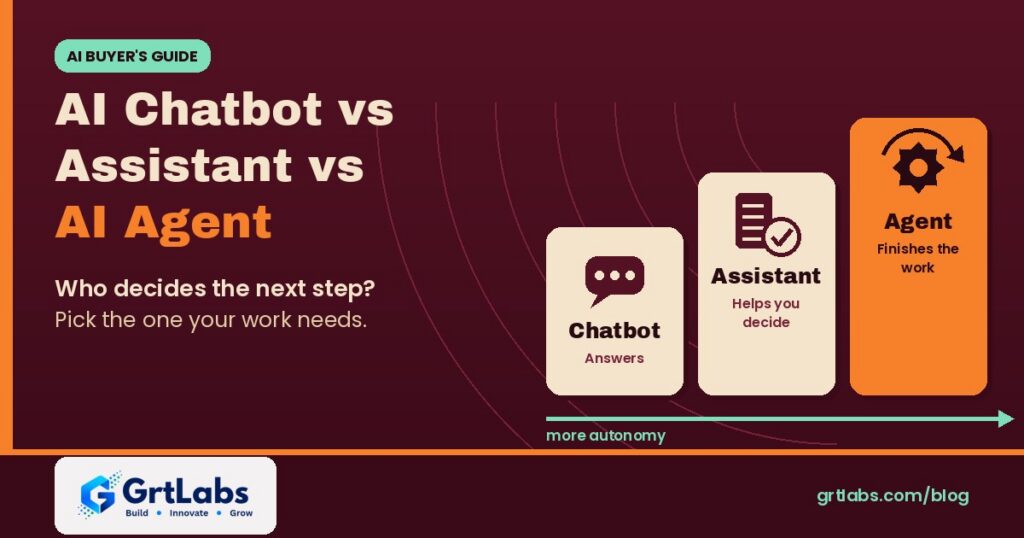
AI Chatbot vs AI Assistant vs AI Agent: Which Does Your Business Need? https://grtlabs.com/wp-content/uploads/2026/10/featured-ai-chatbot-vs-ai-agent-1024x538.jpg 1024 538 Nadeem Shaikh https://secure.gravatar.com/avatar/459d5135d86aff60790fdf4d25ee6958e526211d5cd43d190b1516158cf9feba?s=96&d=mm&r=gAn AI chatbot answers questions in a conversation. An AI assistant answers from your own data and helps a person with tasks, but the person makes the decisions. An AI agent is given a goal and a set of tools, decides the next step itself, and finishes multi-step work across your systems, with a person approving the sensitive steps. So the real difference in AI chatbot vs AI agent is not how smart the model is. It is who decides what happens next. Most businesses should start with the simplest one that does the job and move up only when the work needs it.
Vendors now call almost everything an agent, so it is easy to pay for autonomy you do not need, or to buy a chatbot and expect it to finish work. Below: plain definitions from the platform vendors’ own documentation, a side-by-side table, and five questions to pick the right one.
What is an AI chatbot?
A chatbot is software that talks with people through text or voice. IBM’s chatbot guide splits them into two kinds. Traditional, rule-based chatbots follow predefined rules, decision trees and scripted flows; they work well for predictable questions such as website FAQs. AI chatbots use language models to understand the request and write a natural answer, so they cope with a wider range of questions. As IBM puts it, every AI chatbot is a chatbot, but not every chatbot is an AI chatbot.
Both kinds mostly talk. A typical chatbot answers from a script or general model knowledge, and its job ends with the answer. It does not usually look up your records or change anything in your systems.
What is an AI assistant?
An AI assistant is a chatbot connected to your knowledge and often a few tools, still working at a person’s request. Google Cloud’s explainer describes AI assistants as working with users through each step of a task: the assistant responds to requests or prompts and can recommend actions, but decision-making is done by the user. IBM says the same thing more briefly: AI assistants are reactive, performing tasks at your request.
In a business setting, a good assistant answers from approved sources (usually through RAG, retrieval-augmented generation) rather than guessing, can do small actions such as looking up a record or opening a ticket, and hands the conversation to a person when a request is outside its scope. Our guide to building an internal AI assistant for HR and IT questions walks through one.
What is an AI agent?
An AI agent is given a goal rather than a single question. OpenAI’s Agents SDK documentation defines an agent as a large language model configured with instructions, tools, and optional runtime behavior such as handoffs, guardrails and structured outputs. Anthropic’s engineering guide draws a useful line inside that: workflows are systems where models and tools are orchestrated through predefined code paths, while agents are systems where the model dynamically directs its own process and tool use. Anthropic adds that agents can pause for human feedback at checkpoints and often run with stopping conditions, such as a maximum number of steps.
Microsoft uses the word more broadly: Copilot Studio’s documentation calls an agent an AI assistant that handles conversations and completes tasks, deciding the best next step, and notes that some agents can work proactively from their own account. That overlap is why the terms confuse buyers. The practical test is the same everywhere: does the software decide and carry out the next step itself, or wait for a person? For a longer introduction, read What is agentic AI?.
AI chatbot vs AI assistant vs AI agent: side by side
| AI chatbot | AI assistant | AI agent | |
|---|---|---|---|
| Main job | Answer questions in a conversation | Help a person with a task, step by step | Reach a goal by planning and finishing multi-step work |
| Who decides the next step | The script or the user | The user; the assistant suggests | The agent, within rules and approval steps |
| Knowledge | A script or general model knowledge | Your approved documents and data | Your data, plus results from the tools it calls |
| Actions in your systems | Usually none | A few small actions, such as a lookup or a ticket | Reads and updates records across several systems |
| Interaction | Reactive, one question at a time | Reactive, at the user’s request | Proactive and goal-oriented, after a kickoff |
| Main risk | Wrong or made-up answers | Wrong answers, or showing data to the wrong person | Wrong actions, repeated at machine speed |
| Controls it needs | Clear scope and a handoff to a person | Grounding, access control, logging, escalation | All of that, plus permissions per tool, approvals, step limits and an audit trail |
| Good first example | Website FAQ and opening hours | HR policy questions, IT triage, support drafts | Support triage end to end, lead research and CRM updates, order exception handling |
The table follows the split in Google Cloud’s comparison of agents, assistants and bots (agents most autonomous, bots least) and adds the controls each level needs. In short, the AI chatbot vs AI agent gap is the gap between answering and doing.
The real difference: who decides what happens next
Think of the three as steps on a ladder of autonomy. They often share the same model; what changes is how much the software may decide and do on its own. IBM makes the same point: the ability to call tools does not by itself make a model an agent.
- Chatbot: if it gets something wrong, a person reads a wrong answer.
- Assistant: it looks things up and drafts; a person decides, so mistakes are usually caught before anything changes.
- Agent: it takes actions, so a mistake changes a record or moves an order, and can repeat quickly.
So the work in an agent is mostly in the controls: tool permissions, approvals for sensitive actions, logs and a safe place to test. See AI agent governance, AI agent sandbox and prompt injection protection.
When a chatbot is enough
A chatbot fits when questions are predictable, answers rarely change, and nothing needs to happen in your systems: hours, shipping policy, how to book a visit. A rule-based flow can even be better here because it is predictable and easy to check. Use an AI chatbot if people phrase the same questions many ways, and keep a handoff to a person.
When you need an AI assistant
Choose an assistant when people need answers from your own content, such as policies, product docs or past tickets. Signs you are here:
- Staff or customers ask the same questions, but the answers live in documents that change.
- The useful next step is small and safe, such as opening a ticket or checking a status, and a person still owns the decision.
- You want sources shown with each answer so people can check them.
This is where most companies should start: the risk is contained, and the knowledge layer, access rules and logging are the same pieces an agent needs later. Our post on how to build a company AI assistant breaks this into eight layers.
When an AI agent is worth it
An agent earns its extra controls when work crosses several systems and needs a decision at each step: read a request, gather context, decide, update records, follow up. Examples: support triage that gathers account context and drafts a response, lead research with CRM updates, and exceptions an automation could not finish.
If every step is the same every time, you may not need an agent at all. Anthropic’s advice is to find the simplest solution possible and add multi-step agentic systems only when simpler solutions fall short, because agentic systems often trade latency and cost for better task performance. A fixed workflow or plain AI automation can be cheaper and easier to trust. We compare those options in AI agents vs RPA, and when one agent is not enough, see multi-agent systems.
Five questions to pick the right one
- Does anything need to change in a system? If no, a chatbot or assistant is enough.
- Where do the answers come from? A short fixed list suits a chatbot. Your own changing documents need an assistant with RAG.
- Who should make the final decision? If a person must decide every time, build an assistant. If clear rules cover most cases, an agent with approvals can.
- How many steps and systems are involved? One lookup is an assistant. Several systems with judgment at each step is agent work.
- What is the cost of a wrong action? The higher it is, the more approvals and logging you need, and the more it pays to add autonomy one step at a time.
Common mistakes when choosing
- Buying the label. Ask the vendor which steps the software decides and performs alone, and which a person approves.
- Broad access on day one. Start agents with read-only tools and add write access per tool.
- No handoff or no logs. Every level needs a path to a person and a record of what it said and did.
- No knowledge layer. Without your documents behind it, the AI sounds confident and is wrong about your business. RAG explained covers grounding.
How GrtLabs helps
GrtLabs is a Houston, Texas AI and software development company, founded in 2019, that builds custom AI, agentic AI, RAG, AI automation, and web and app development. Our AI Assistants are grounded in your approved knowledge, take action through connected tools such as looking up a record or creating a ticket, and escalate to a person with full context. When the work needs more autonomy, our Agentic AI team designs agents with clear goals, allowed tools, permissions and escalation rules, deployed with human-in-the-loop approval steps and logging of every step.
Not sure which level fits? Our AI Discovery engagement helps pick the right first proof of concept. We also build GRTforms, our own drag-and-drop form builder with a Create with AI option, which is a simple way to collect the structured requests an assistant or agent works from. Working with a team in Texas? Meet our AI development company in Houston.
Still weighing AI chatbot vs AI agent for your team? Talk to our Houston team about your use case.
Frequently asked questions
What is the difference between an AI chatbot and an AI agent?
An AI chatbot answers questions in a conversation and usually stops there. An AI agent is given a goal and a set of tools, decides the next step itself, and carries out multi-step work across systems, such as updating records, with a person approving sensitive actions.
What is the difference between an AI assistant and an AI agent?
An AI assistant works at a person’s request: it answers from your data, suggests actions and may do small tasks, but the person makes the decisions. An AI agent works toward a goal after a kickoff, choosing which tools to use and when, within the permissions and approval steps you set.
Is ChatGPT a chatbot, an assistant or an agent?
It depends on the setup. Used for questions and answers, a general model acts as a chatbot or assistant. It becomes part of an agent when it is given instructions and tools and allowed to decide and carry out the next steps toward a goal.
Which one should a business start with?
Most businesses should start with an AI assistant grounded in their own documents, with access control, logging and a handoff to a person. The risk is contained, and the knowledge layer and controls are needed later if you add agents.
Are AI agents safe to use with company systems?
They can be, with the right controls: least-privilege permissions for each tool, approval steps for sensitive actions, limits on the number of steps, logs of everything the agent did, and testing on real examples in a sandbox before production.
Can GrtLabs build AI assistants and AI agents in Houston?
Yes. GrtLabs is a Houston AI and software development company, founded in 2019, that builds grounded AI assistants, agentic AI, RAG knowledge systems and AI automation. Contact the team at grtlabs.com/contact to discuss your use case.
