
IDP vs OCR vs Cognitive Document Automation: Terms Explained
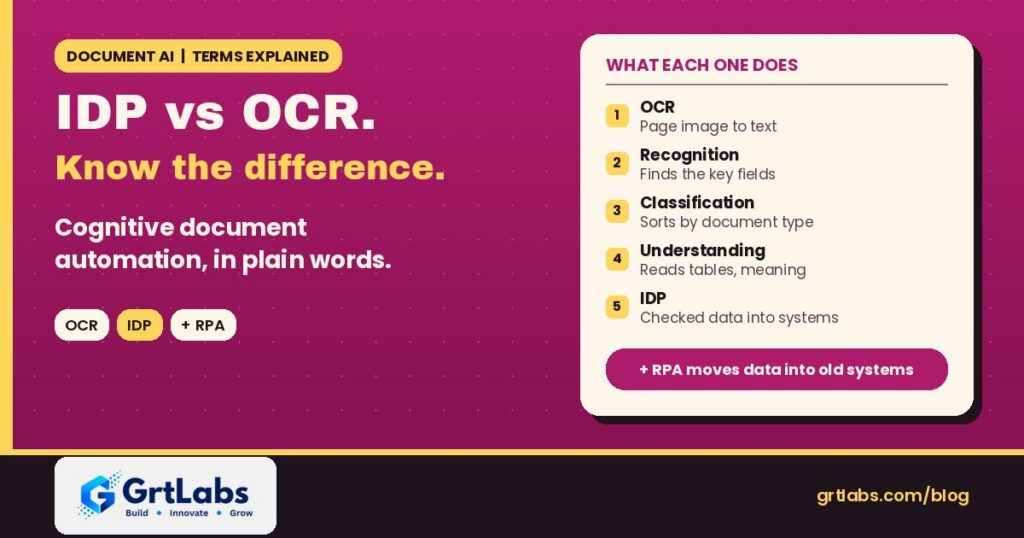
IDP vs OCR vs Cognitive Document Automation: Terms Explained https://grtlabs.com/wp-content/uploads/2026/11/featured-idp-vs-ocr-1024x538.jpg 1024 538 Nadeem Shaikh https://secure.gravatar.com/avatar/459d5135d86aff60790fdf4d25ee6958e526211d5cd43d190b1516158cf9feba?s=96&d=mm&r=gOCR turns a picture of a page into text. Intelligent document processing (IDP) goes further: it works out what kind of document it is, pulls out the fields you need, checks them, and sends clean data into your systems. Cognitive document automation is mostly another name for IDP, with the stress on AI that reads a document in context instead of relying on fixed templates. Intelligent document recognition, intelligent document understanding and intelligent document classification are steps inside that same pipeline. If you only need searchable text, OCR is enough. If you need data you can act on, you need IDP, and RPA or workflow automation can carry that data into older systems.
This guide is for owners, finance, operations and IT leads comparing document automation vendors.
The short version: document AI terms side by side
Vendors use these names in different ways, so treat the table below as plain working definitions, not official standards.
| Term | What it does | What you get |
|---|---|---|
| OCR (optical character recognition) | Turns scanned images and PDFs into machine-readable text | Text, sometimes with position on the page |
| Intelligent document recognition (IDR) | Works out what a document is and where the key fields sit, even on a new layout | Document type plus located fields |
| Intelligent document classification | Sorts incoming files by type, such as invoice, purchase order or claim form | A label and a route for each document |
| Intelligent document understanding | Reads meaning: tables, line items, checkboxes, how fields relate | Structured data with context |
| Intelligent document processing (IDP) | The full pipeline: capture, classify, extract, validate, export, with human review | Checked data in your ERP, CRM or finance tools |
| Cognitive document automation | A common name for AI-first IDP that reads documents in context | Same as IDP in practice |
| IDP + RPA | IDP reads the document, RPA or workflow automation enters or moves the data | An end-to-end process with fewer hand steps |
What OCR does, and where it stops
OCR is the oldest piece of the stack. It looks at an image of a page and outputs the characters it sees. Modern OCR is good at clean printed text and can handle many scans and phone photos.
What OCR does not do is understand the page. It does not know that one number is an invoice total and another is a PO number. Older capture tools added templates on top of OCR: draw a box where the total sits on a supplier’s invoice, and read whatever text lands in that box. That works until the supplier changes its layout, a new sender appears, or a scan is slightly rotated. Then someone has to build or fix another template.
What intelligent document processing (IDP) adds
IDP uses OCR as one input, then adds AI and business rules to turn documents into data you can use. A typical IDP pipeline does six things:
- Capture. Pull files from email inboxes, upload portals, scanners or shared folders.
- Classify. Decide what each document is and split multi-document PDFs.
- Extract. Find the fields you need, including tables and line items, on layouts it has not seen before.
- Validate. Check values against your data and rules, such as a known vendor, a matching PO or totals that add up.
- Review. Send low-confidence fields and rule failures to a person, with the page next to the data.
- Export. Post clean records into your ERP, CRM, accounting or e-commerce system, with a log of what happened.
We cover the full pipeline in our guide to intelligent document processing, and the field-level detail in how IDP reads a form.
Intelligent document recognition, understanding and classification
These three terms describe parts of IDP. Vendors sometimes sell them separately.
Intelligent document recognition
Intelligent document recognition is the step where the system works out what it is looking at before extracting anything. It recognizes that a page is an invoice, a bill of lading or a claim form, finds the vendor, dates and totals even on an unfamiliar layout, and gives each field a confidence score so weak reads can be flagged.
Intelligent document understanding
Intelligent document understanding is about meaning. It reads tables and line items, ties a quantity to the right product, notices that a checkbox is ticked, and understands that a date near the word due is the due date. This is where large language models have changed things the most, because they read a page more like a person does.
Intelligent document classification
Intelligent document classification sorts the incoming pile: invoices to accounts payable, contracts to legal, claim forms to the claims queue. It also splits a single scanned PDF that holds several documents. Our post on AI document classification explains how sorting and routing work in practice.
What cognitive document automation means
Cognitive document automation is a term some vendors and analysts use for document automation driven by AI rather than by templates. The word cognitive points to the system reading and reasoning about a document the way a person would, instead of reading text out of fixed boxes.
In practice, cognitive document automation and IDP describe the same kind of system. Both classify documents, extract data in context, validate it against rules, and send exceptions to people. Whichever name a vendor uses, ask what the product does at each step.
Signs that a product really works in context:
- It handles a new supplier’s layout without someone building a template first.
- It reads tables and line items, not just header fields.
- It shows a confidence level per field and routes weak reads to review.
- It shows where each value came from on the page.
IDP and RPA: how they work together
Robotic process automation (RPA) uses software bots to click through screens and type data into applications, the way a person would. RPA repeats fixed steps well, but it does not read documents.
That makes IDP and RPA a natural pair. IDP reads the invoice or form and produces checked data. RPA, or a workflow tool that calls APIs directly, takes that data and enters it into the ERP, updates a record or triggers the next step. When the target system has a proper API, a direct integration is usually more reliable than a screen bot, because it does not break when a screen changes.
For a worked example of document data flowing into finance systems, see how to automate invoice processing with AI and our guide to freight invoice processing. The workflow side is what our AI Automation work covers.
Which one does your business actually need?
Start from the result you want, not the label:
| If you need to… | You probably need |
|---|---|
| Make scanned records searchable | OCR |
| Read one fixed form that never changes | OCR with simple templates, or light IDP |
| Sort a mixed inbox of documents by type | Intelligent document classification |
| Pull fields from invoices, POs or forms from many senders | IDP (cognitive document automation) |
| Check extracted data against your records before posting | IDP with validation rules and human review |
| Enter the data into an older system with no API | IDP plus RPA |
| Search and ask questions across a document library | IDP indexing plus a RAG knowledge base |
Most teams asking about cognitive document automation sit in the middle rows: many senders, manual typing today, and a system that needs clean data.
How to evaluate document AI vendors
Labels will not tell you much. These checks will:
- Test on your own documents. Give every vendor the same sample set, including bad scans, new layouts and multi-page files, and compare results field by field.
- Ask what happens on a new layout. Does it need a template, a few training examples, or nothing?
- Check field-level confidence and review. You want a review screen that shows the page and the data side by side, and only sends what needs a person.
- Look at validation. Can it check vendors, PO numbers and totals against your data before anything is posted?
- Confirm the integrations. How does data reach your ERP, CRM or accounting tool: API, file export or RPA?
- Ask about data handling. Where documents are stored, how long they are kept, who can see them, and whether a log records every change.
- Understand the running costs. Ask how pricing scales with pages or documents, and what maintenance looks like when your documents change.
- Plan a pilot. Agree on a sample, a definition of a correct field and a review process before you sign.
If no product fits your documents, rules or systems, a custom pipeline built on proven OCR and AI services can be the better route.
How GrtLabs builds document pipelines
GrtLabs Inc is a Houston-based AI and software development company, founded in 2019. Our Document Intelligence service builds IDP pipelines that classify, extract and validate data from invoices, purchase orders, forms and contracts, then push clean records into the systems you already use. People review anything the rules do not clear, and every step is logged.
If you are not sure which approach fits, AI Discovery is a short engagement where we look at your documents and process before anything is built.
Comparing OCR, IDP and cognitive document automation for your team? Talk to GrtLabs and bring a few sample documents.
Frequently asked questions
What is the difference between OCR and IDP?
OCR turns an image of a page into text. IDP uses OCR as one step, then classifies the document, extracts the fields you need, validates them against your rules and data, and sends clean records into your systems, with human review for exceptions.
What is cognitive document automation?
Cognitive document automation is document automation driven by AI that reads documents in context instead of using fixed templates. In practice it describes the same kind of system as intelligent document processing (IDP).
What is intelligent document recognition?
Intelligent document recognition is the step where AI works out what a document is and where its key fields are, even on a layout it has not seen, and flags low-confidence fields for review before data is extracted.
Is intelligent document understanding the same as IDP?
Not exactly. Intelligent document understanding is the part of IDP that reads meaning, such as tables, line items, checkboxes and how fields relate. IDP is the full pipeline around it, including capture, validation, review and export.
Do I need RPA if I have IDP?
Only if the system that receives the data has no usable API. IDP reads the documents; RPA or a workflow tool moves the data into other systems. A direct API integration is usually more reliable than a screen bot.
How do I compare document AI vendors?
Test every vendor on the same set of your own documents, including bad scans and new layouts. Compare field-level accuracy, review screens, validation rules, integrations, data handling and how running costs scale.
